


liked this post? share it on social
If you’re thinking about starting a freelance copywriting business, you probably have a ton of questions about where to invest your money and what tools to use, like:
- Do I need a CRM? (No, but it will make your life SO MUCH easier.)
- How do I keep track of my income and expenses as a freelance copywriter? (Google Sheets works in the beginning. Don’t trust me—I learned it from a tax attorney.)
- Can I use my Gmail address for my business email? (You can, but I don’t recommend it.)
I don’t believe in gatekeeping (at least not when it comes to running a copywriting business). So here’s literally everything I use in my day-to-day work as a freelance copywriter who gets clients from my website, social media, and speaking engagements.
The Tools I Use as a Freelance Copywriter
Dubsado
For inquiries, calls, proposals, contracts & invoices
My entire client experience is built inside Dubsado, from the inquiry form on my website to the questionnaire I send my website copy clients.
What I love about Dubsado is that it lets me use automation (I don’t need to manually send you an invoice once you sign a contract) but still feels high-touch and personal.
Literally everything inside my Dubsado account has been customized to feel on brand, either by me or my favorite systems specialist, Gail from Worksimple.

Want to know exactly how I use Dubsado as a website copywriter? I’ve got you covered.
(And if you’re a wedding pro, I have a list of 23 ways you can use Dubsado, too.)
Note: if you’re getting paid via Dubsado, you’ll also need to set up Stripe for payment processing. There’s no subscription fee, but Stripe takes a percentage of each invoice (as of now, it’s AMOUNT).
Cost: $35/month or $335 annually for Starter, and $55/month or $525 annually for Premier (but using code ANDREAS20 will save you 30% off your first month or year)
Is there a free or trial version? Yes, there’s a 21-day free trial that gives you access to the Premier plan so that you can try all the features
Showit
For my website and blog
My website and blog are both hosted by Showit. Like a lot of creatives, I was initially drawn to Showit because their sites are design-forward, but still easy to update on your own.
The other thing I like is that Showit uses WordPress to power blogs, so you have access to the entire library of WordPress plugins to help with blogging.
If you’re planning to DIY your website, Showit has a lot of stunning templates to choose from. I’ve put together a list of my favorites.
Cost: It ranges from $27/month to $49/month, depending on your plan (but I’d recommend paying for a plan with a blog).
Is there a free or trial version? Yes, there’s a 14-day free trial.
Keysearch
For SEO keyword research and tracking
If you’re DIYing your website copy or blog, you’ll need to do research to choose which keywords to target. You’ll hear a lot about tools like SEMRush or Ahrefs, but unless you’re an SEO professional, I don’t think you need to spend that much.
My friends at Inkpot Creative tipped me off to Keysearch, and I’ve been a subscriber ever since.
When I’m researching keywords for a client, I rely on their keyword research tools as well as their competitive analysis (PSA: it’s NOT cheating to see which keywords your clients are targeting).
For my own business, I use it for keyword research, as well as tracking my rank for specific keywords. Twice a year, I also use their Site Audit function to see where I can tighten up my SEO even further.
Cost: $24/month or $240/year (you don’t need the Pro plan, which is more for SEO agencies)
Is there a free or trial version? Yes, there’s a 14-day free trial.
Flodesk
For my weekly newsletter & email marketing
If you’re subscribed to my weekly newsletter, you’ve already seen what Flodesk can do. (And if you’re not on my email list, join the party!)
Flodesk makes it easy to send well-designed emails and track exactly how they’re performing. Their email builder is drag-and-drop, and it’s easy to set your brand colors, upload custom fonts, and create different sections for different types of content.
In addition to my newsletter, I also use Flodesk for automated email sequences, like the ones you’ll receive if you download one of my free resources.
A few of my favorite things about Flodesk
- The built-in QR code generator—I use it every time I give a talk, so that attendees can scan it to have the slides emailed to them
- Link actions: Unlike other email software I’ve used, it’s easy to tag users when they click on a link, so they can opt out of a sequence but stay subscribed (and there are lots of other uses)
- The user interface: The process of designing an email, selecting a subject line and preview text, and then choosing who to send it to literally couldn’t be easier
- Flodesk Studio: New layouts that can be assembled block-by-block (with your brand colors auto-applied!), then customized until they’re pixel-perfect. (More about how I use Studio here.)
Cost: Starting at $19/month for the Lite plan and $28/month for the Pro plan, which lets you have unlimited workflows. You can use my link to get 25% off your first year!
Is there a free or trial version? Yes, but the free version is fairly limited—you can build an opt-in page but you can’t send emails
Google Workspace
For my email, files & meetings
When I deliver copy to my clients, it’s in a Google Doc. It’s the easiest way to work on copy in real time, so that I get notifications as soon as clients edit or comment on the doc. And if you’re a copywriter, you can get creative and wireframe copy within Docs, like I do.
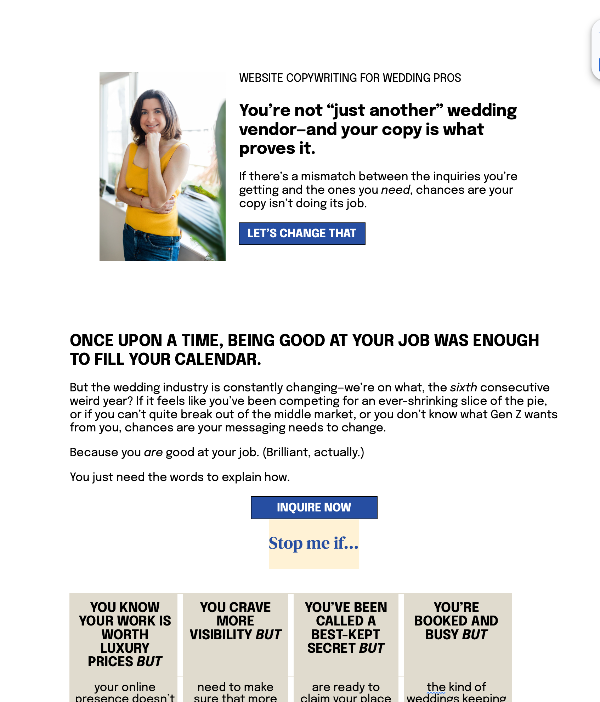
Even though I’m a creative, Google Sheets is kind of the unsung hero of my business. I have a bookkeeping spreadsheet that I update every Friday (it’s this one!) as well as a metrics tracker that I update once a month.
I also regularly use other features of Google Workspace, including Meet, Calendar, and Gmail (but you don’t need me to go into detail, because you can probably guess how).
Cost: $16.80/month for the Workspace Standard plan, which lets me record & transcribe meetings
Is there a free or trial version? Yes, there’s a free forever version but it only lets you have an @gmail.com email address
Amazing Marvin
For keeping track of my tasks
If there’s a task management tool out there, I’ve tried it. This is the only one that works for me, mostly because it’s super customizable.
You can set Marvin up like a traditional to-do list, or you can enable the strategies that work best for you. My list each day is divided between Essential and Bonus tasks.
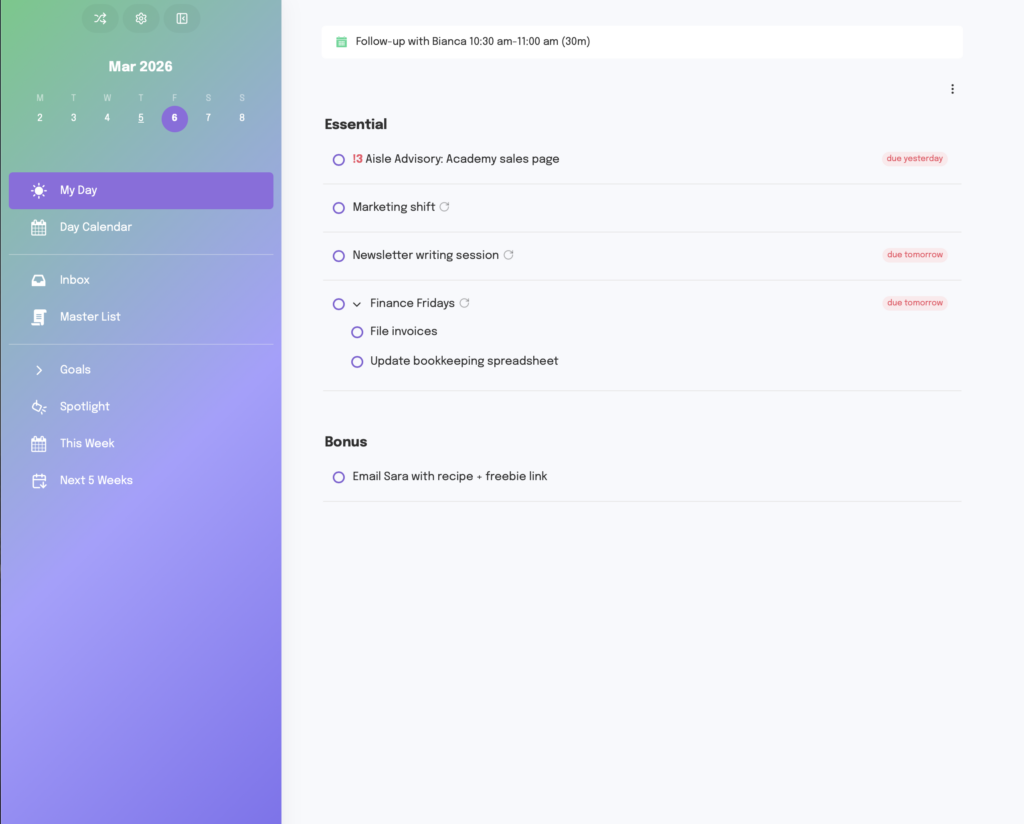
A few of the features I love in Amazing Marvin:
- Recurring tasks are really easy to set up, even at weird intervals
- It has a built-in time-tracking tool, so you don’t need a separate subscription just for that
- You can assign your tasks to a goal, so that you can track the progress you’re making toward that goal
- There’s a day calendar where you can add time blocks and also drag tasks to a time slot (this is the thing that’s kept me away from ClickUp—to do time blocking correctly, you need a third-party tool)
- The new Spotlight feature suggests tasks based on what you’ve been working on, where you’ve made progress, or what’s overdue
Literally everything in Marvin is customizable—the fonts, the colors, the entire user interface.
I should note that I also use a paper planner (it’s this one!), because I like a little screen-free planning time in the morning. I use that to decide what I’m prioritizing on a certain day, then I drag-and-drop those tasks into my day on Marvin.
Cost: $12/month or $72 annually
Is there a free or trial version? Yes, there’s a 14-day free trial.
Notion
For trackers & content planning
Notion is where I brain dump everything EXCEPT my to-do list.
Because Notion’s so flexible, it’s ideal for content planning. I actually have separate planners for social content, blogs, and newsletters because that’s what works for my brain.
I also use it to create trackers—for example, conferences where I’ve applied to speak, podcasts I’ve guested on, etc.
A few of my favorite Notion templates to get you started:
- The Passions Collective: Client portal (I use a modified version of this to keep all my files & links in one place for each project)
- Xanthe Appleyard’s content planning template
Cost: Free, but if you’re looking to use Notion with clients or a team, you may need to upgrade to a paid plan, which starts at $10 per user/month.
Is there a free or trial version? Yes, and it’s unlimited for one user
Calm
For soundscapes
Confession: I rarely listen to music when I’m working, unless I’m doing something that doesn’t involve writing.
But I often want to tune out ambient noise, especially when someone’s going to town with a leaf blower on the other side of the fence.
That’s why I have Calm installed on every device I own. When it’s time to focus, I cue up a soundscape like “Rainfall Recharge” or “Crackling Fireplace” and get to work.
Cost: $80/year (but some credit cards offer you a free year’s subscription, so check!)
Is there a free or trial version? Yes, there’s a 7-day free trial
Canva
For designing Instagram carousels, Reel covers, presentations, and PDFs
If you’re planning to market your freelance copywriting business on social media, you’re going to want a Canva account sooner or later.
Among the things I’ve designed in Canva: Instagram carousels and Reel covers, slide decks for presentations, workbooks, and plenty of random one-off graphics.
While you can definitely get by with a free account, I have a Pro account so that I can upload my brand fonts and easily apply my color palette.
To make content creation easier, you may want to invest in Canva templates so that you don’t spend hours fiddling with design. My favorites are made by Tonic (use code ANDREAS15 to save 15%) and Lauren Does Marketing.
Cost: $120/year for the pro version
Is there a free or trial version? Yes, there’s a free version, but you don’t have access to all features, including graphics, background removers, custom fonts, etc.
What I’d Get If I Were Starting My Freelance Copywriting Business From Scratch
If you’re a brand-new freelance copywriter who’s just starting out, here are the 3 tools I’d recommend investing in first:
- A paid Google Workspace account
First of all, one of the best things you can do for your business is have a you@yourdomain.com email, because it’s way less likely to get flagged as spam. If you’re trying to keep expenses low, Google can sub in for a lot of other software as well—a Standard plan can replace Zoom, Loom, HelloSign, and Calendly. - A website of some kind
The right website platform is the one that you’ll get up and running ASAP. I’m happy with Showit, but the startup cost can be high depending on the template you pick. Squarespace is another great option, as is WordPress.
Note: both Canva & Notion offer a “website” option. It’s fine if you just need to put together a portfolio, but it’s not going to show up in search. - A marketing tool
I’m leaving this one open-ended, because it’s up to you how you’re going to market. If you’re planning to blog, I’d recommend investing in a tool like Keysearch so you can focus on SEO.
On the other hand, if social media is more important to you, you might want to spring for Canva Pro or a scheduling tool like Enji.


