


liked this post? share it on social
As a solopreneur who usually has 25-30 hours in a given week to get things done, I need systems that keep things “working” even when I’m not working.
Which means I need a way to make sure that invoices get sent, inquiries get responded to, and forms get filled out whether I’m in the office or not.
For the past several years, Dubsado has been a key part of the tech stack behind my website copywriting business, and here’s why I’m obsessed:
4 Reasons I Rely On Dubsado
- Client experience is everything. The easier I can make it for my clients to book and work with me, the happier they’re going to be. Period.
- Everything is aligned with my brand. I may not be a designer, but I love it when everything in my business looks and feels on brand.
- It saves me precious time. The more I can use automation and workflows to do the tedious part, the more time I can spend on my clients’ copy.
- It works when I don’t. I can’t be online 24/7, but that doesn’t mean things don’t get done. Dubsado responds to inquiries, sends contracts, and books calls even when I’m on vacay.
The Dubsado Features I Use The Most As a Copywriter
H3: Inquiry forms for a seamless booking process
I’ve been using Dubsado to host my inquiry form for 3+ years. I especially love that I can customize the form to match my website exactly.

It’s also easy to add custom fields so that I can gather the details I need to make sure that I’m a good fit for the project.
If you have more than one offer, you can add a form field where clients can select what they’re interested in, and you can start different workflows from there.
(Also, I have the mobile app, and there’s nothing better than getting a notification that someone’s inquired about working with me!)
Questionnaires that feel completely on-brand
My whole process is supposed to be one form, one call, and one week of revisions
Which means that I need to gather everything I need for a client project in one form. That’s where my questionnaire comes in.
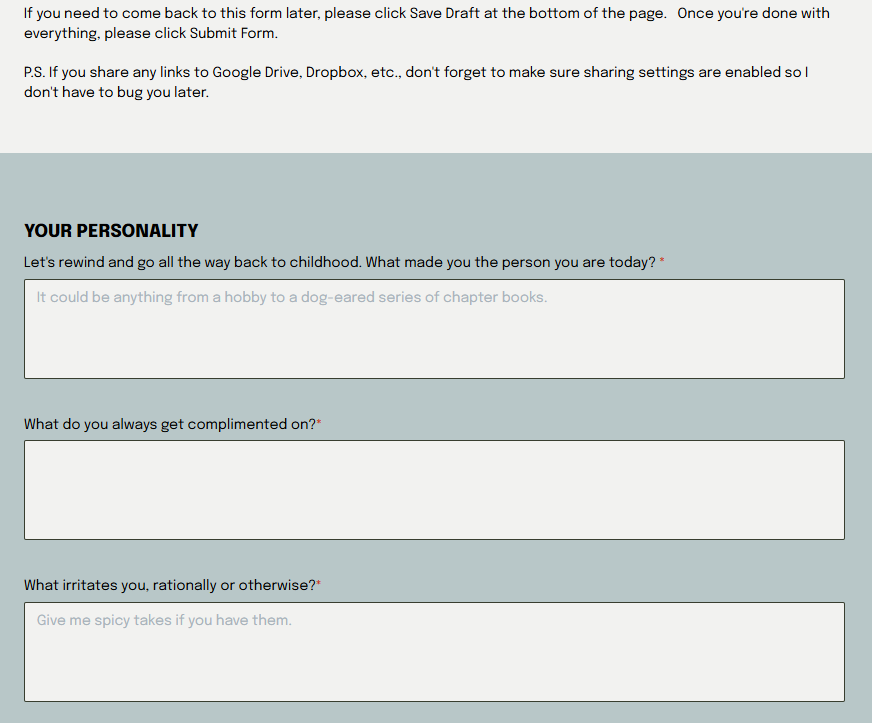
A few things I love about forms within Dubsado:
- It’s easy to customize them to use your brand fonts, colors, and photos (which, again, I’m picky about even though I’m not a designer)
- Clients can save a draft of their form and come back to it later
- You can add fields for URLs, as well as a file uploader, so they can provide everything in one place
- Unlike some forms (ex. Notion), it’s easy to add text blocks for explanations if you need them
Inside Dubsado, I’ve set up several questionnaire templates based on the different vendor categories I work with. I like to go in and personalize the questionnaire even further based on our discovery call.
Workflows: Automate what you want (and personalize the rest)
With Dubsado, you can use workflows to automate as much (or as little!) of your business as you want.
For example, I’ve set up my inquiry workflow so that clients receive an automated reply immediately after inquiring, so they know the form went through.
Then I review the details of their project and get back to them with a personalized reply within a day or so.
You can also use Dubsado’s workflows to automate other manual tasks, like:
- Reminding a client to complete a form you’ve already sent them
- Following up with someone who inquired but never booked a call
- Sending a welcome guide once a contract is signed
- Requesting a testimonial after a project ends
Public proposals make booking a cinch
Not every offer needs a discovery call or a full proposal.
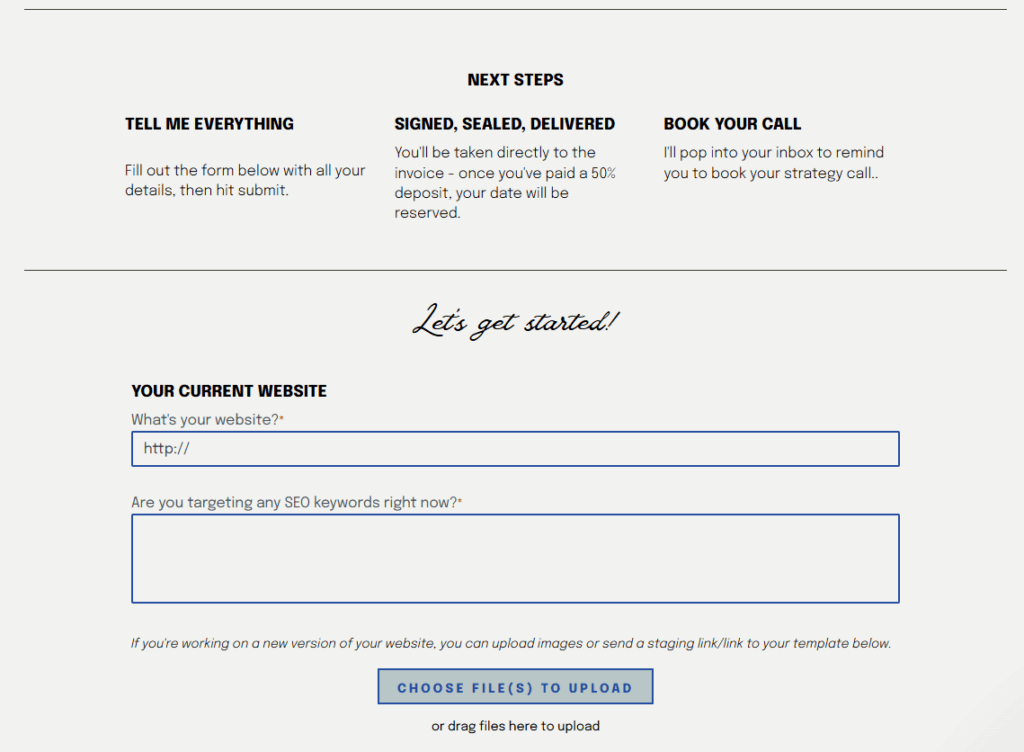
If you want your clients to be able to book straight from your website, you can create a public proposal. They’ll fill out a form that gives them all the info you need, then sign the contract and submit the invoice to hold their spot.
I do this for my Copy Makeunders, and it works beautifully.
Canned emails: Write it once, then you’re done
Every business owner has emails they send over and over (and over). But you absolutely should not be rewriting these from scratch with every project.
With Dubsado, you can save them in the “canned email” library, add variables (like the client’s name or project start date) and then reuse them. Your canned emails can also be added directly into workflows.
The approval feature in workflows means you can use canned emails but make sure that they never go out without being customized further for your client.
(And not every email in your business needs to be customized. I never tweak the emails that go out to remind clients of upcoming payments or calls.)
Easy payments and reminders
For me, “invoicing” is that task that gets pushed to the back burner in favor of something more interesting every time.
With Dubsado, my invoices are the third step in my booking process, so there’s no delay between signing the contract and paying your deposit.
For follow-up payments (because I love a payment plan!), clients can save their credit card information and set up autopay if they want. I can also automate reminders to go out several days before an invoice is due, and follow-ups if it’s not paid on time.
Why I Personally Use Dubsado Instead of Honeybook
Clients don’t have to enter their email to view forms
By default, Honeybook makes clients enter their email or an access code to view anything you’ve sent them—a form, an invoice, a contract, etc.
This makes it tricky for your clients to share forms with someone else, like a parent or a wedding planner.
You can turn this feature off on a project basis, but honestly, I don’t trust myself to always remember.
(I know that Honeybook has this feature for security purposes. But for the types of forms I send, it’s not usually necessary.)
No additional fee for card-on-file payments
Dubsado charges X for all credit card payments. Honeybook charges the same amount if your client enters their credit card number manually. But if you let them save it for recurring payments, they charge an additional 0.5%.
It doesn’t seem like a lot, but over the course of a year, it adds up.
I want to do everything I can to make life easier for my clients, which means letting them set up autopay and/or save their credit card info.
No tiered support
If you want “priority support” with Honeybook, you need a Premium plan, which costs $109/month. However, the other features in the Premium plan aren’t really necessary unless you’re running a larger business.
Dubsado’s support has always been super quick to reply to my questions in chat, and the same support is available to all users.
Want to give Dubsado a try yourself?
Since I’m a Dubsado ambassador, you can save 30% on the first month (or year!) of your subscription by using my affiliate link.


