

It’s easy to think that because you’re a photographer, your images should do the heavy lifting on your website. The truth is that images attract—but words convert.
So yes, rely on your images to get them to your site. But once they arrive, your words are what’s going to take them from “hmm, I’m interested” to “I have to reach out to this person.”
Your website copy is also what’s going to help you show up in Google search results—or as the answer when your dream client asks ChatGPT “who’s the best newborn photographer in Milwaukee?”
I’m sharing 8 of my best copywriting tips for photographers, including plenty of examples so you can actually see what I’m talking about.
1. Before you write your website copy, read your client reviews
The secret to good copy is that it’s 80% research and 20% writing. As a website copywriter, I start every single project by doing a deep dive into my clients’ reviews to learn how their clients view them.
There are two main reasons to start with your reviews:
- The reasons your clients hired you, and what they loved about your photos, aren’t always the ones that come to mind if you have to talk about yourself.
- We want your website copy to use the same language that your ideal clients would.
So before you write a word of copy, here’s what we’re going to do:
Open up a blank Google Doc or Notion page, and break it up into the following sections:
- How They Describe Themselves
- Objections / Concerns
- Questions
- How They Describe Your Photos
- How They Describe Your Process
- How They Talk About You As a Person
Then, as you go through your reviews, copy and paste quotes into each of these categories. Sometimes we’ll find a juicy quote to use as a testimonial; other times, we’re just going to use a word or a specific idea.
For the purposes of this exercise, the following count as reviews: Google reviews (obviously), text messages, Instagram DMs, emails, etc. If it’s a past client sharing their thoughts with you, you can use it.
2. Make sure your homepage hero is crystal-clear
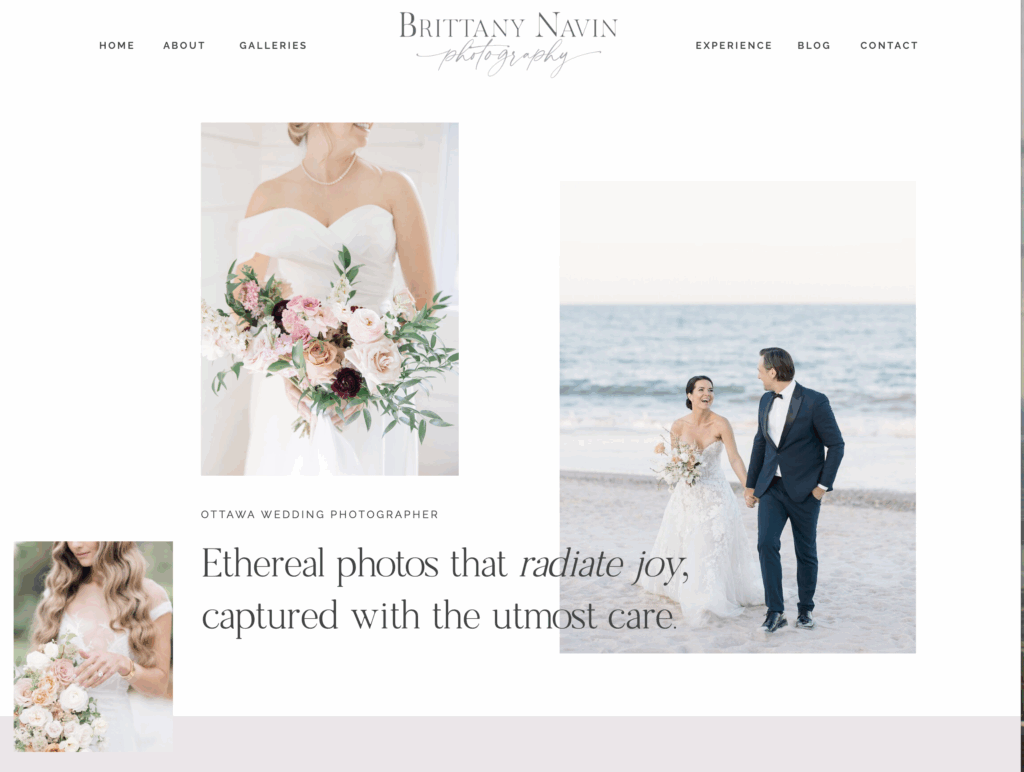
Your hero is the part of your homepage that a user sees BEFORE they scroll. It’s called a “hero” because it often features one “hero” image, like this one from Between the Pine.

Here’s the thing: we have about 5 seconds to make a good impression on our website. In that time, you need to communicate what you do, who you are, and where you are.
You’re better off JUST saying where you are, who you are, and what you do than using a clever tagline that leaves the reader with questions.
One of my favorite tricks is to use “eyebrow copy” to convey the necessary details. (It’s called “eyebrow copy” because it’s a line of smaller text that sits above your headline, like an eyebrow.) Then you have the freedom to be creative with a meaningful tagline below.
3. Remember that your copy is as much about the experience as the photos
Even when they love your photos, clients have questions about what it’s like to work with you.
One question that’s always on their mind—no matter what type of photography you do—is “We’re not photo people. How are you going to make us look good?” Your copy should directly address your approach to posing, as well as how you get them to feel comfortable in front of your camera.
But your client experience goes beyond just helping them relax. Maybe you’re a brand photographer who also helps with creative direction, so they don’t have to Google “what props do I bring to my brand shoot.”
Maybe you’re a newborn photographer who stocks juice boxes and Cheerios for older siblings.
Or maybe you’re a wedding photographer who can diffuse tension with a well-timed dad joke.
Your future clients want to know this stuff.
For the team at Between the Pine, I’ve written copy around how they pack your favorite snacks on your elopement day. It’s a small thing, but it serves as shorthand for the care they take with every single client. (And they follow through—on their inquiry form, they ask about your favorite snack.)
When you’re talking about what it’s like to work with you, your past clients’ words should play a major role. Rather than write that you’re “gentle” and “patient,” let them speak for you. Make sure that the testimonials on your website aren’t just about the photos, but about their experience as clients.
4. Optimize your website copy and meta content for SEO
Even if Google isn’t your main source of clients, you should make sure your website is SEO-optimized. As a bonus, the work you do to optimize your site for SEO will also help you show up in ChatGPT search results.
Here’s what you need to know to optimize your photography website for SEO (and apologies in advance, because you’re about to read the word “optimize” a dozen more times):
Target one keyword per page
Each page of your wedding photography website should target one main keyword. These keywords should be ones that your actual clients are likely to use.
If you do multiple photography types, you have to be careful about how you structure your keywords. Using “South Carolina family and wedding photographer” is not the same as “South Carolina wedding photographer”—and very few wedding photography clients will be searching for the first one.
Write content that answers your clients’ questions
Google ranks pages based on how well it thinks they answer a question. If someone searches for “Washington elopement photographer,” the question they’re asking themselves is “which Washington elopement photographer should I hire?” And the page that answers that is going to be the one with details on pricing, packages, and even your photography style.
If they don’t find the information they need—or if the site loads slowly—they’re going to hit the back button quickly. That signals to Google that the page wasn’t especially useful, and they’ll file that away for later.
So when you write copy, put yourself in your client’s shoes and think about the answers you would want when trying to book a photographer.
I always add a FAQ section to the services page when writing for photographers, so we have a place to answer the questions that don’t fit naturally into the rest of the copy.
(Like “can we have the RAW files?” or “do you offer payment plans?”)
Make sure to include plenty of text per page
Every page that you want to appear in search should have a minimum of 300 words of text. Fewer than 300 words, and Google considers it a “thin’ page, which means that it’s less likely to rank.
Yes, many luxury photographers have minimalist websites that have very little text and lots of images. However, their clients likely aren’t finding them through SEO. Instead, people come to their website after getting a referral from a planner, reading about them on a “top photographers” list, or seeing them featured in a publication like Vogue.
Include a meta title and description for each page
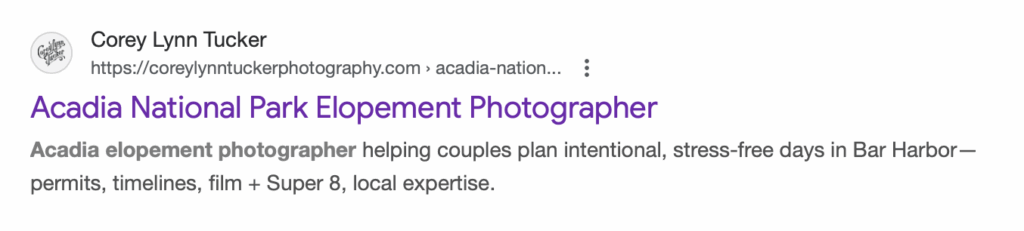
Before you publish each page, make sure that you’ve also written a meta title and meta description that include the keyword you’re focusing on. This is what shows up in Google search results, so it should be clear about what they’ll get if they click (and a little enticing, too).
If you search “acadia elopement photographer” you’ll find a landing page from my client Corey Tucker, and this is how the meta title and description appear:
Optimize your portfolio page for SEO
One page that often gets overlooked when it comes to SEO is your portfolio page. Make sure it’s not just a series of images. Instead, add text that gives each set of images context—and includes keywords that future clients are searching for.
The easiest trick to fit in more keywords is to give each gallery a descriptive title—not just “Amy and Jonah’s Wedding” or “Lisa’s Maternity Shoot.”
Instead, say “An Elegant Country Club Wedding in Arlington, VA” or “A Beachfront Maternity Session.”
Don’t forget to optimize your images for SEO
This isn’t my area of expertise, because it usually happens during the design stage. Instead, I’m going to send you to Kiersten of Sonder Studio to learn more about how to compress your images, rename your photos, and write alt text. (Kiersten does all the blogging for some of my photographer clients, and she really knows her stuff.)
5. Your About page needs to show your personality—and your approach to photography
As a copywriter for photographers, I have read a lot of wedding photographer websites, so trust me when I tell you this:
Too many About pages begin “I’ve been in love with photography since the first time I picked up a camera.”
Which is probably true—but it’s not memorable, which is a huge part of the role of your About page.
For example, for my client Kelly Loss, a DC wedding photographer, we told the story of how she originally worked as an event planner, and how that shaped her approach to wedding photography.
Other photographers are more art-driven, and their About page may take the shape of an artist’s statement. On my client Alexandria Vigliotti’s About page, we wove together fun facts with mentions of her formal education and artistic influences.
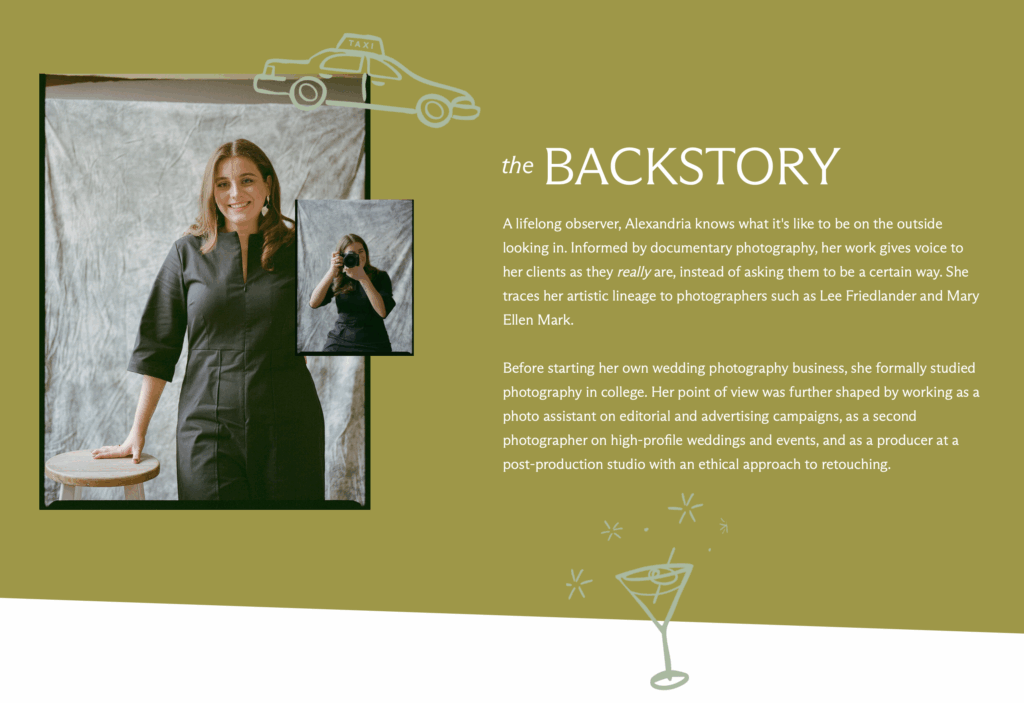
This is the time to get creative. Clients want to know that that there’s a real person behind the camera. As a bonus, they’ll often bring up your “fun facts” on a consultation call as a way to connect or break the ice.
Bonus tips:
- Make sure you include a photo of yourself on your About page.
- If your clients engage with team members, such as associate photographers or an office manager, you’ll want to add a brief bio and a photo for each of them.
6. Write separate service pages for each type of photography you offer
If you do both family and wedding photography (this is the most common example I come across), you want a separate page for each one, for several reasons:
- It lets you target a separate keyword for each page. The more keywords you target, the more chances you give your website to show up in search.
- You can make the copy so much more specific. A couple looking for a wedding photographer isn’t interested in hearing how good you are at wrangling toddlers, and a family looking for holiday photos isn’t worried about wedding-day timelines.
Photographers who take this approach usually focus on weddings on their homepage, with a mention of their other types of work (and a link to each specific service page).
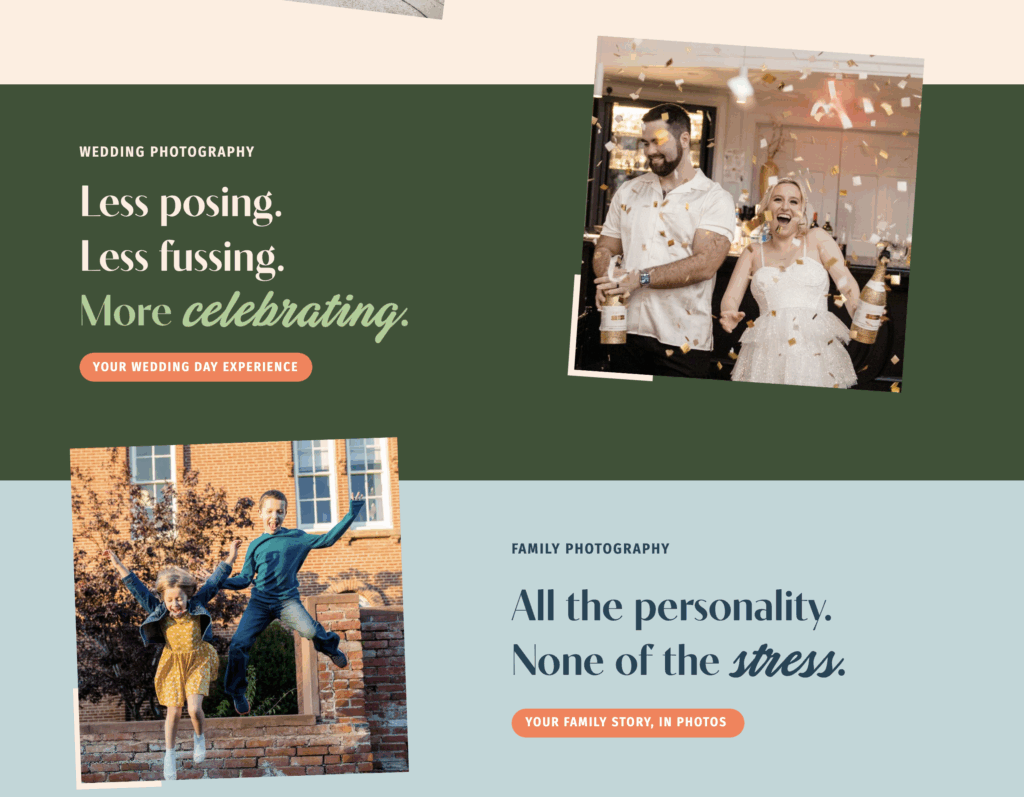
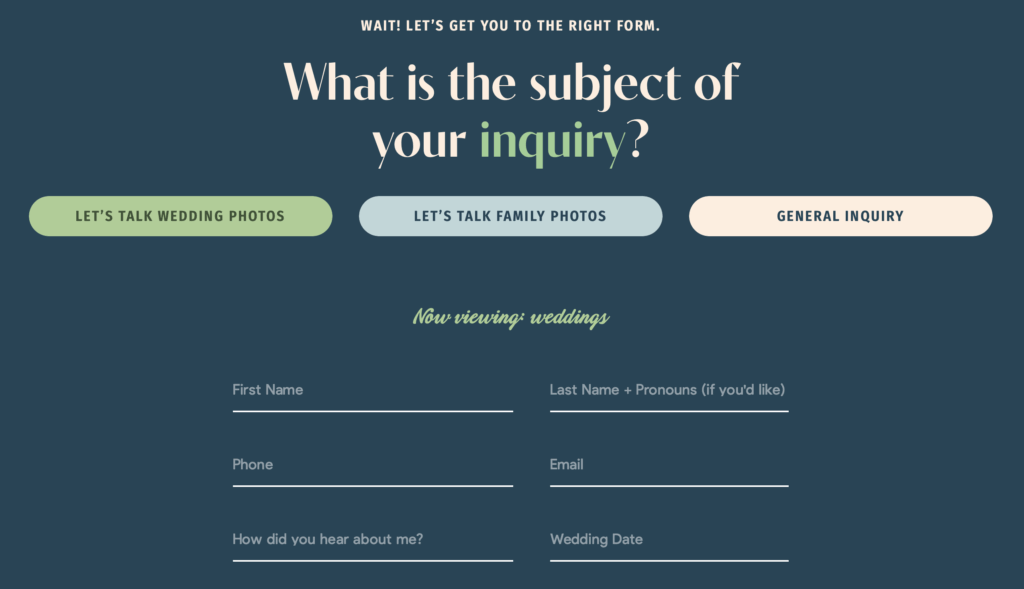
Kelly (and the design team at Inkpot Creative) even went a step further and added a toggle on her contact page, based on whether you’re interested in weddings or family photos.
Other examples where you may want to have multiple service pages:
- You do both traditional weddings and elopements, and the pricing and packages are significantly different.
- You offer photo and video, especially if they don’t need to be booked together.
- You offer add-ons that clients might search for separately, like a photo booth service or guest portraits.
7. List your pricing on your services page
Clients, especially Gen Z, don’t want to waste your time (or theirs) if they don’t know your pricing.
Usually, if they can’t figure out how much it costs to book you, they do one of three things:
- They cross you off their list and inquire with other photographers who do share their pricing on their website.
- They inquire anyhow—and then ghost if you’re not in their budget.
- They ask around to find out your pricing before they inquire, which might mean they get inaccurate or outdated information.
If you want to book more photography clients, sharing pricing in your website copy often leads to more inquiries.
That said, depending on the type of photography you do, you can’t always give them an exact price. Sometimes it’s easier to do a “starting at” price or say that “the average client spends $XXXX.” (I have a blog post that explains 7 different ways to share your pricing on your website to help you figure out the best strategy for your photography business.)
A few other tips on sharing your pricing:
- If you have more than one package, list the most expensive one first and work your way to the cheapest. The first price they see will serve as their reference point for everything else. Starting with the most expensive one makes the cheaper ones feel like a good deal.
- Context matters. If you’re sharing a “starting at” price, let them know what might increase the cost (guest count, travel fees, number of events, etc.)
Every time I talk about pricing, I include this disclaimer: if you don’t currently share your pricing, but you’re fully booked with clients you love (at prices that work for you!), you don’t have to change anything. If one day you’re not seeing as many inquiries as you used to, then experiment with sharing them and see what happens. You can always go back.
8. Use clear call-to-actions (and plenty of them)
Remember what I said about your homepage hero needing to be clear, not clever? The same is true of your call-to-action buttons.
As a general rule, before someone clicks a button or a link on your site, they should know where it’s going to take them. A button that says “Inquire Now” or “Book Your Session” is as clear as can be.
You also need more than one call-to-action button per page, especially on your service page(s). Remember that potential clients are scrolling on their phone while they’re at the dentist or sitting in the bleachers at their kid’s soccer game. It sounds like a small thing, but having more than one button makes it easier for them to inquire—and the easier you make it, the likelier they are to book.
Prefer not to write your own website copy? I’ve written website copy for many photographers, and I’d love to work with you next. Learn more about my website copywriting services.


